There’s a strange kind of disappointment happening in AI right now.
You open a model on Thursday. It remembers that you like concise answers. It remembers your tone. It remembers that you’re building a startup, or writing a book, or planning a move, or trying to be less overwhelmed than you were last month.
And for a second, that feels impressive.
Then you ask a real question about your work.
What did we decide in that strategy thread on Tuesday? Which version of the pricing page did we agree to test? Where did that customer quote go? What were the three objections from the investor call? Which research notes actually made it into the draft? What’s still unresolved?
That’s when the magic thins out.
Because a lot of today’s AI can remember *you* just enough to feel personal, while still failing to remember the actual state of your work.
That gap matters more than most product demos admit.
It’s also why “AI memory” has become one of the most confusing phrases in tech. The market keeps talking like memory is a single feature. It isn’t. There are different kinds of memory, and for founders, creators, operators, and anyone trying to hold together a complicated life, the kind that matters most is still missing in most tools.
At MindMesh, this is the problem the product is built around. Not just saving notes. Not just storing chats. Not just making AI feel friendlier. The real challenge is giving your thoughts, decisions, and active projects a place where context can actually survive.
Your thoughts deserve a better home. So does your work.
The memory everyone is shipping isn’t the memory most people need
The current wave of AI product updates tells a pretty clear story.
Models are getting better at personalization. They remember preferences. They adapt to your style. They try to carry over facts about you so each new session feels less cold.
That’s useful. No question.
But if you’ve spent any time doing real knowledge work with AI, you know personalization memory is not the same thing as work memory.
These are different layers:
1. Preference memory This is the “knows your style” layer.
It remembers things like: - you prefer bullet points - you like direct feedback - you work in marketing or product - you’re building a company - you want responses in a certain voice or structure
Helpful? Sure.
But this is surface continuity, not project continuity.
2. Session memory This is what the model can hold inside the current conversation.
It knows what you said ten messages ago. It can track the thread while you’re still in it. Sometimes it can reference recent chats if the product supports that.
This is better than starting from zero every single time, but it’s still fragile. Session memory tends to break when the work spills into multiple documents, meetings, tasks, and days.
Which is to say: real life.
3. Work memory This is the layer most people actually mean when they say, “I wish AI remembered.”
Work memory means the system can carry forward: - project history - past decisions - draft evolution - meeting takeaways - source material - unresolved questions - linked tasks - relevant notes from months ago - what changed, and why
This is not just memory for *conversation*. It’s memory for *continuity*.
And continuity is what most work is made of.
A founder doesn’t need an AI that feels familiar. They need one that knows what’s going on
Imagine a founder in the middle of a normal week.
Monday: investor call. Tuesday: product feedback review. Wednesday: rewrite the homepage. Thursday: pricing discussion with the team. Friday: update the pitch, answer customer objections, prep the next sprint.
Nothing here is especially exotic. This is just modern work.
The problem is that each piece of context ends up in a different place: - call notes in one app - strategy thoughts in another - AI brainstorming in a chat window - customer language in a doc - tasks in a project manager - random insight captured on the phone while walking into a meeting
By Thursday, the founder is asking AI for help with pricing strategy. The model may remember they’re a founder. It may remember they like blunt advice. It may even remember the company category.
But does it know: - what the team already ruled out? - which customer segment responded best? - what promise the homepage draft now makes? - what tension came up in Tuesday’s feedback review? - which pricing concern was raised by the last three prospects?
Usually, no.
So the founder starts rebuilding context manually.
Again.
This is one of the quietest forms of mental overload in modern work: not just doing the work, but constantly reconstructing the state of the work for systems that should already know it.
Why this feels so exhausting even when AI is “getting better”
A lot of people can feel the problem before they can name it.
They’re not annoyed because AI is bad. In many ways, it’s excellent. Fast, fluent, often useful.
They’re annoyed because it keeps being smart in the wrong place.
It can help rewrite an email in seconds, but not remember the decision behind the email.
It can summarize a meeting transcript, but not connect that meeting to the draft it changed.
It can suggest a launch plan, but not carry forward the constraint your team discovered two weeks ago.
It can sound incredibly capable while still forcing you to do the most cognitively expensive part yourself: rebuilding the world around the task.
That’s what burns people out.
Not just too many apps. Not just too much information. But too little continuity.
You start to feel like your work has no central home. Just fragments.
A few notes here. A few chats there. Half-finished drafts. Tasks with no history. Ideas you know were good but can’t find when you need them. Decisions made in motion and then quietly lost.
This is where a lot of productivity systems break people’s trust. They store the pieces, but they don’t help the pieces stay alive together.
The market is moving toward memory, but mostly from the wrong side
This is why the current AI memory conversation feels both exciting and incomplete.
Yes, memory is improving. Yes, tools are getting more persistent. Yes, research workflows are becoming more context-aware. Yes, AI products are racing to become more than one-off chat interfaces.
That matters.
But a lot of that movement is still focused on one of two things:
Personalization Make the assistant feel more tailored to the user.
Retrieval Make it easier to fetch information from uploaded documents, notes, or sources.
Both are valuable. Neither automatically creates work continuity.
That’s the missing distinction.
A system can retrieve a file without understanding its role in the project. It can remember your preferences without remembering the evolution of your thinking. It can search the archive without carrying forward the live state of the work.
And for founders and operators, *state* is everything.
What changed? What’s decided? What’s pending? What’s connected? What should happen next?
Those are not personalization questions. They are work memory questions.
MindMesh is built around the kind of memory work actually needs
This is where MindMesh becomes more than a note-taking app, more than a chat tool, and more than a productivity stack with prettier branding.
A cognitive workspace should be able to handle your actual life: your notes, tasks, captures, conversations, documents, decisions, and the invisible threads between them.
That’s the real promise.
In MindMesh, the goal isn’t simply to save information. It’s to preserve context so the work can keep moving without you having to rebuild everything from scratch.
Here’s what that looks like in practice:
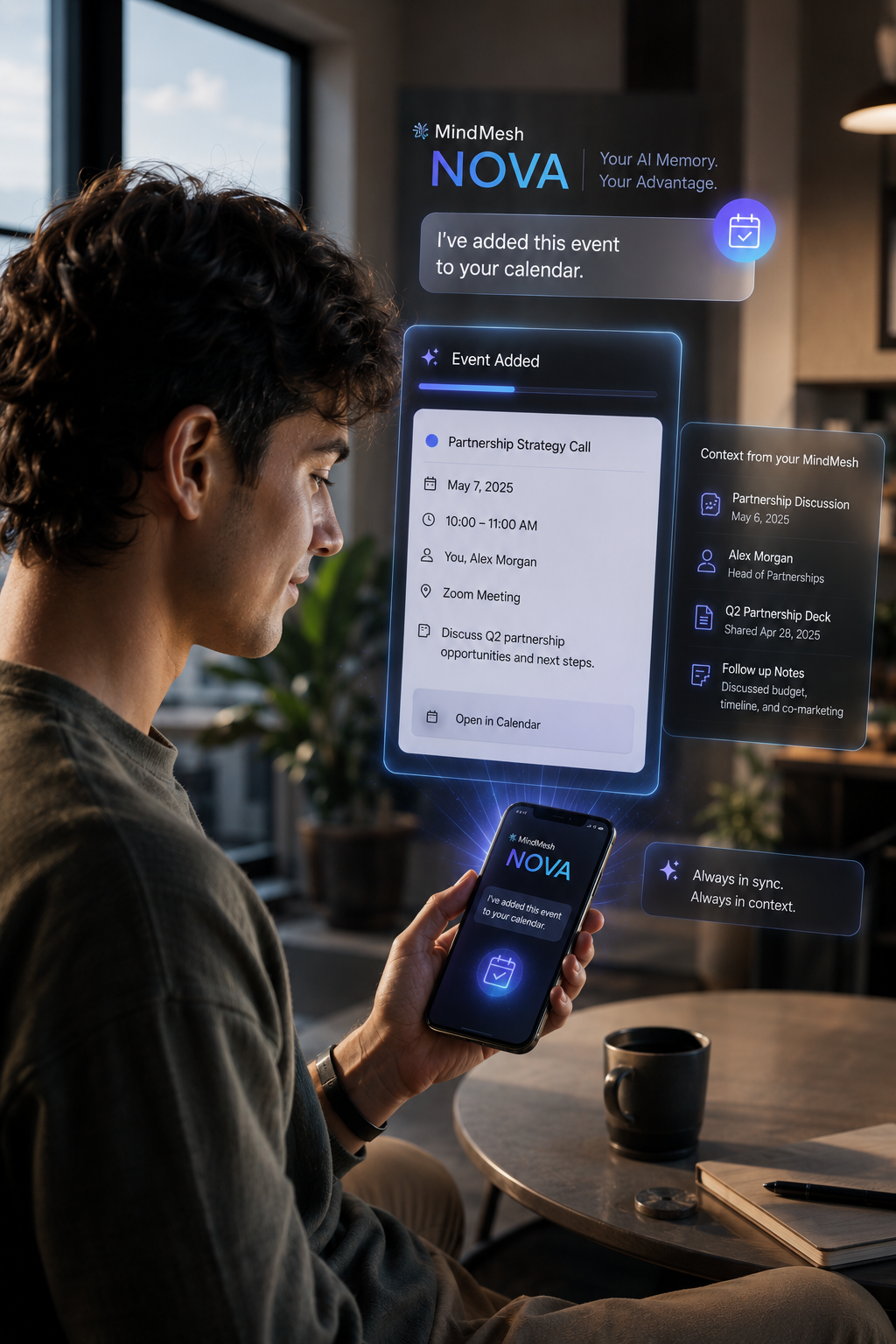
Scattered capture becomes connected context You jot down a customer objection after a call. You save a rough launch idea during lunch. You ask Nova a question about pricing later that night. You add a task for your team the next morning.
In a normal stack, these become separate artifacts.
In a cognitive workspace, they become part of the same living project context.
Old thinking becomes usable again A note from three months ago shouldn’t disappear just because you forgot which folder it lived in. If it becomes relevant to a conversation today, the system should be able to surface it.
That’s the difference between storage and intelligence.
You can retrieve decisions, not just documents When work gets messy, most people don’t need another file search. They need the answer to something more human: - What did we decide? - Why did we decide it? - What supports that decision? - What still needs follow-up?
That’s where Nova’s context retrieval matters. Instead of making you browse ten places and reconstruct the thread, it can search across your workspace and pull forward the notes, captures, linked tasks, and prior conversations that belong to the question.
You can resume work without rebuilding your setup This may be the most underrated feature in any serious AI memory workspace.
When you come back to a project after two days, or two weeks, the hard part is rarely “generate text.” The hard part is “help me re-enter the state of this thing.”
A useful workspace helps you resume. It doesn’t make you perform your own archaeology first.
This changes how creators, operators, and founders actually work
The idea can sound abstract until you see how often it shows up in real life.
For founders A founder is juggling product, hiring, customer feedback, fundraising, and content at the same time.
They need a workspace that can connect: - investor questions to pitch revisions - customer pain points to homepage messaging - meeting notes to tasks - product debates to roadmap decisions
Without work memory, every area becomes another loop of context rebuilding.
With a connected cognitive workspace, those loops start to collapse.
For creators Creators don’t just make one thing. They turn one thread of thinking into ten outputs.
A podcast idea becomes: - research notes - a script - a newsletter - short clips - social posts - a follow-up angle for next week
The problem isn’t lack of ideas. It’s losing the trail between them.
When the workspace remembers the source material, related drafts, previous prompts, and unfinished angles, the work compounds. You stop creating from scratch every time.
For operators and chiefs of staff Operators live in decision flow.
A meeting creates action items. A Slack thread changes priority. A draft reflects one version of reality while the spreadsheet reflects another. Three people think a decision was made, but no one can find where it actually happened.
This is exactly where work memory matters most.
A cognitive workspace doesn’t just collect operational debris. It gives the work a memory, so follow-through has a spine.
The next AI category battle won’t be about better answers
For a while, the AI conversation was dominated by model quality.
Which model writes better? Which one reasons better? Which one hallucinates less? Which one is faster?
Those questions still matter. But they’re no longer the whole game.
The next real battle is about whether AI can live with you across time.
Not in a creepy personal way. In a useful work way.
Can it hold project continuity? Can it reconnect scattered thinking? Can it preserve decisions across artifacts? Can it help you re-enter a moving piece of work without making you explain everything again?
That’s a much bigger challenge than making a model sound smart for one session.
And it’s why cognitive workspaces matter.
Because the future of working with machines is not just asking better questions in a cleaner chat window. It’s building environments where your thinking can accumulate, organize itself, and remain available when your brain inevitably gets overloaded.
That’s the real promise of AI memory.
Not “it knows I like short emails.”
“It knows what this work is, where it stands, and what matters next.”
A better test for any AI tool
If you’re evaluating AI tools right now, there’s a simple question worth asking:
Does this system remember me, or does it remember my work?
Those are not the same thing.
A tool that remembers your preferences may feel polished.
A tool that remembers your work can change your life.
Because most people aren’t struggling with a tone problem. They’re struggling with fragmentation.
Too many places to put things. Too many half-systems. Too many good thoughts lost because there was no central home for them. Too many AI sessions that felt useful in the moment and disposable a week later.
That’s why MindMesh feels less like another app category and more like a lifestyle correction.
Not “here’s one more tool to manage.”
More like: here is a place where your work and your thinking can finally live together.
A place big enough to hold your projects, notes, tasks, conversations, and the context between them.
A place where useful thinking doesn’t vanish into isolated sessions.
A place where you can stop starting over.
Your work deserves more than personalization
Personal AI will keep getting better. Assistants will feel warmer, smoother, more tailored, more aware of who you are.
That’s fine. It’s probably inevitable.
But if we confuse personalization with continuity, we’re going to keep building tools that feel intimate while remaining structurally forgetful.
And that’s not enough for real work.
Knowledge work needs memory with consequence.
Memory that carries decisions forward. Memory that connects artifacts. Memory that helps you resume. Memory that compounds instead of resets.
That’s the opportunity in front of this whole category.
And it’s the standard people should start demanding.
If your current stack keeps scattering your thoughts across chats, notes, tasks, and disconnected tools, it may be time to rethink what “memory” should mean in the first place.
MindMesh is built for that shift: an AI cognitive workspace designed to help you handle, manage, and organize your entire life in one connected place.
Because your thoughts deserve a better home.
And honestly, your work does too.
---
Explore more in [MindMesh Magazine](https://resources.mindmeshapp.com/magazine), browse [resources from MindMesh](https://resources.mindmeshapp.com/resources), or see how the workspace works at [MindMesh](https://mindmeshapp.com).
Your thoughts deserve a better home.
Turn scattered context into a workspace that helps you think, organize, and move.
Explore AI Models